Customer personas turn audience research into fictional characters that help define who an advert should speak to. These details are communicated through the visuals of advertising, such as the clothes, setting, activities, and product interaction. Normal stock photos may not seem to relate to the audience of a campaign. Each message is made clearer in context and purpose with specific scenes. Dreamina’s Marketing Studio encompasses product references, image production, video creation, and video editing. This article is about persona-inspired creative ideas, not about AI-generated characters as customer research.
Understanding Customer Personas as Visual Advertising Concepts
A customer persona is a fictional profile of an audience segment, derived from research. Demographic data can be used to guide styling, and interests and routines can be used to guide activities or places. When a customer buys something, it can be about convenience, performance, presentation, or value. The Dreamina AI marketing studio can transform creative directions into unique product images and promotional videos. It may be used by a commuter, a designer, or a family in their home. Generated characters are still illustrative; they are no proof of actual preferences and are not able to predict purchasing behaviour.
Translate Persona Characteristics into Distinct Visual Elements
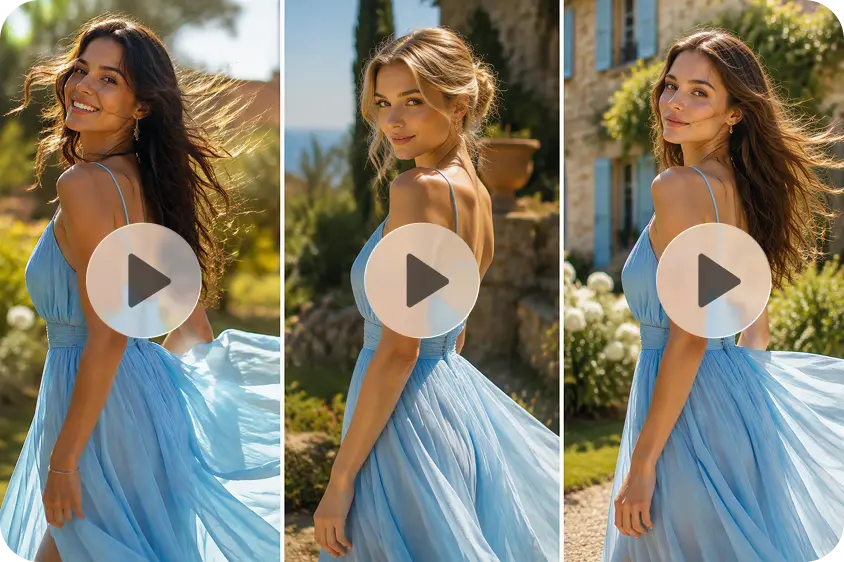
Develop each concept based on specific persona information, not general assumptions. Lifestyle representation begins with familiar activities, like going to work, working out, studying, or cooking. Select settings and activities that make the role of the product comprehensible. Correlate each item with the persona’s expressed needs. Wardrobe should contribute to the desired ambiance, but not stereotype the wearer. Environmental elements such as workplaces, houses, outdoor places, and play areas provide context. Character presentation relies on appropriate avatar references, convincing appearances, and continuity between assets. Visual mood is also important: lighting, colour palettes, framing, and photographic treatments differentiate concepts. The product should be integrated in a natural way and maintain the recognisable packaging, shape, labels, and design features.
Use Dreamina’s Marketing Studio to Develop Persona-Based Ad Concepts
Dreamina’s Marketing Studio can be used for product photography, posters, lifestyle photography, and advertising videos. Providing a clear product image provides a reference for how the product should look. AI image generation puts products in persona-inspired environments and photographic styles. AI video creation creates lifestyle scenes, with product interaction and promotional storytelling. Using an avatar to deliver videos can help to introduce products in a presenter-style or creator-inspired way. Reference images are used to inform composition, and reference videos are used to inform the structure of the story and visual treatment. Some workflows substitute people or products in the concepts of reference with provided assets. Reusable product and avatar references enable variations to be created for a product without having to recreate all the creative directions.
Visualize Customer Personas in Ads Through Dreamina AI Marketing Studio
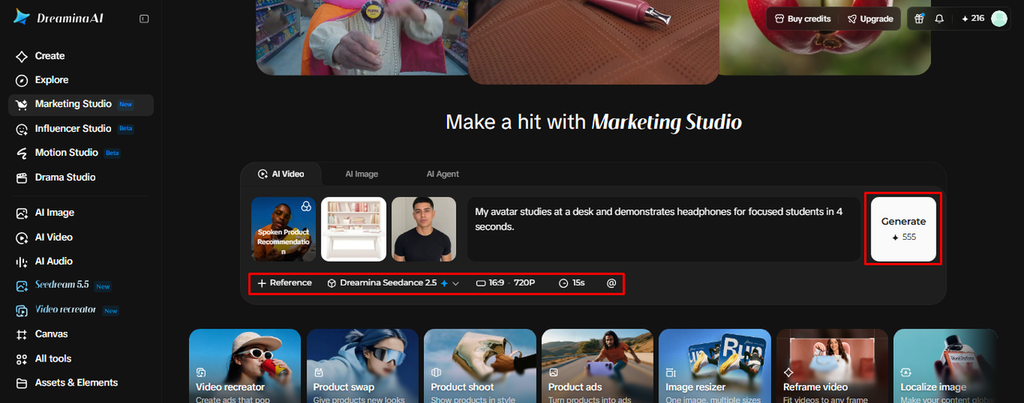
Step 1: Build your persona scene with a product and avatar
- Sign up or log in to Dreamina first, because you need an account to begin creating.
- Then head to “Marketing Studio” on the left bar to find the persona ad tools.
- Choose “AI video” for ad videos or “AI image” for persona visuals. Select “AI agent” if you want image and short video creation together.
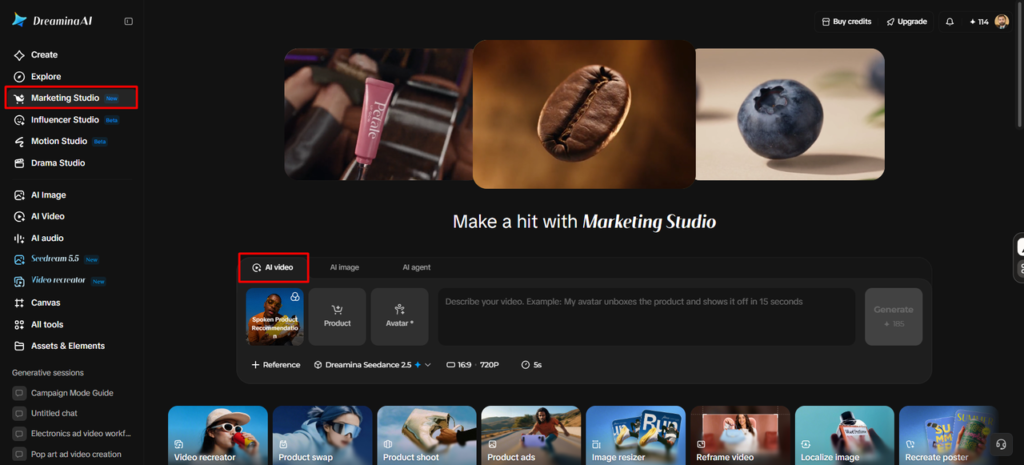
- Within “AI video”, select “Change style” to match the ad’s mood to your target audience.
- Click “Product” to upload your product photo, then click “Avatar” to bring in a presenter who fits your persona. You can also choose from the library with existing products and avatars.
- Write a prompt that explains how the ad should look and feel. Feel free to add custom direction about your persona’s age, habits, or setting.
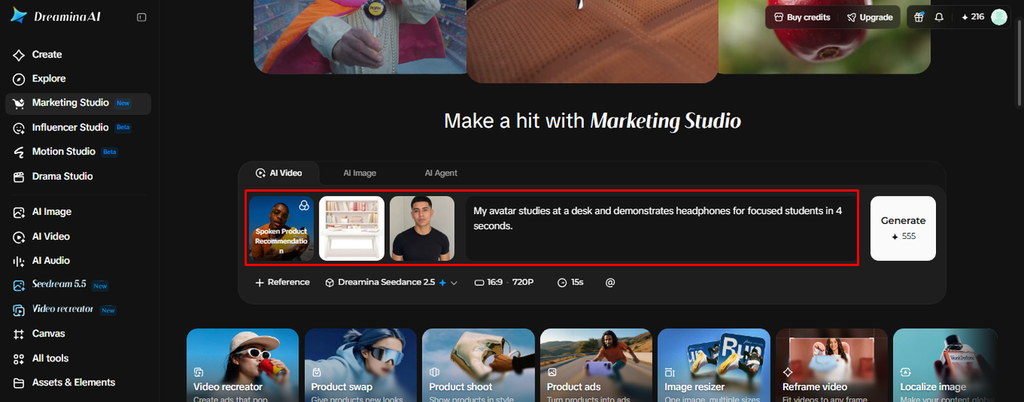
Step 2: Choose your output settings and generate the ad
- Click the “Reference” tab to add a video that shows the AI the look you want.
- Choose a model such as HappyHorse 1.1, Dreamina Seedance 2.5, or Dreamina Seedance 2.0. You can also try Dreamina Seedance 2.0 Fast, Dreamina Seedance 2.0 Mini, Wan 3.0, and others.
- Pick the custom aspect ratio and resolution from the “Aspect ratio” and “Resolution” tabs for your ad placement.
- Click the “Duration” tab to select a custom video length for the ad.
- Type the “@” option to mention or highlight the specific product within your video.
- Finally, click “Generate” to begin creation.
Step 3: Review the ad, polish the details, and export it
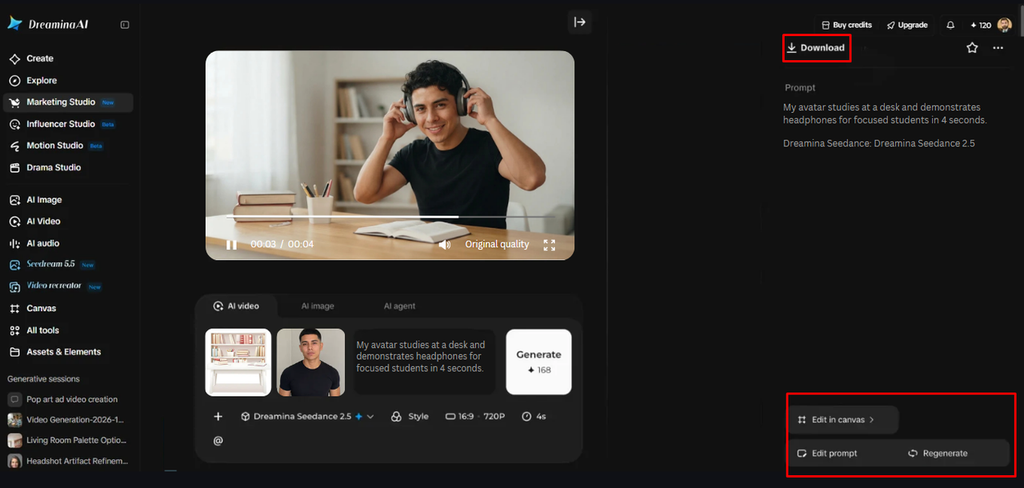
- Watch the finished video on full screen and check the product framing, the avatar’s delivery, and the pacing.
- If the persona feels off, use “Edit prompt” or “Regenerate” to refine the ad.
- You can also use “Edit in canvas” to replace the background, add effects, crop the video, and more.
- When the ad looks right, click “Download” to save the video and share it across your marketing channels.
Build Different Advertising Concepts Around the Same Product
When each scene is the result of research in a specific context, one product can have several creative directions. Maintain the product’s identity while changing its surroundings, style, and aesthetic state. Possible concepts include:
- Professional persona: Organize the product in a neat workspace and style the product.
- Outdoor persona: Use natural settings, active routines, and compositions that suggest mobility or recreation.
- Creative persona: Add colourful studios, artistic things, and expressive backgrounds.
- Minimalist persona – opt for scenes with minimal clutter, subdued colors, and a straightforward product presentation.
- Home-based persona: Display the product in familiar home settings and in familiar activities.
- Premium persona: Employ elegant interior, lighting, and compositions.
Maintain Consistency Across Persona-Based Advertising Variations
Consistency enables audiences to identify products in various creative treatments. Look for product references that are clearly used more than once and examine packaging, proportions, colors, labels, and distinguishing characteristics. But different backgrounds, lights, camera angles, and product positioning may impact continuity. Check the faces, hands, clothes, text, and product information for unwanted changes. Make sure you verify the accuracy of labels or distorted packages before publishing. Attach persona descriptions to interviews, analytics, surveys, or other viable research. Scenes can be created using AI, but audience validation is not a substitute for that.
Prepare Persona-Inspired Ads for Multiple Platforms
Make adjustments to each asset to suit its location prior to export. Vertical images work well for mobile-first video placements and square images work well for many product feeds. Landscape formats are suitable for wider banners, presentations, and certain video placements. Include all important product information in areas where it won’t be cut off. Dreamina’s Marketing Studio allows for different dimension adjustments for various marketing channels. There are tools to support localization of image text and promotional videos for various language markets. Localized variations are easy with reusable product and avatar assets.
Conclusion
Persona-inspired advertising brings audience descriptions to life creatively. Specific settings, styling, and product interactions convey specific campaign ideas. Dreamina’s Marketing Studio combines product images, avatar presentations, and promotional video creation in a single workspace. Good results come from good research, good representation, and good review. Don’t use generated personas as evidence of customer behaviour; use them as visual storytelling tools.