Accessing Gimkit Home for Capital Region Students and Families
Gimkit Home is the online starting point for joining a teacher’s game, completing an assignment, or managing learning activities from home. For Capital Region families, students, tutors, and educators, it can be a useful digital study tool alongside schoolwork and local learning programs.
To access it quickly:
- Go to Gimkit.
- Choose Join to enter a live game code from a teacher or host.
- Sign in to view assignments, saved progress, classes, and available study kits.
- Teachers and parents using an educator account can create question sets, host games, assign practice, and review reports.
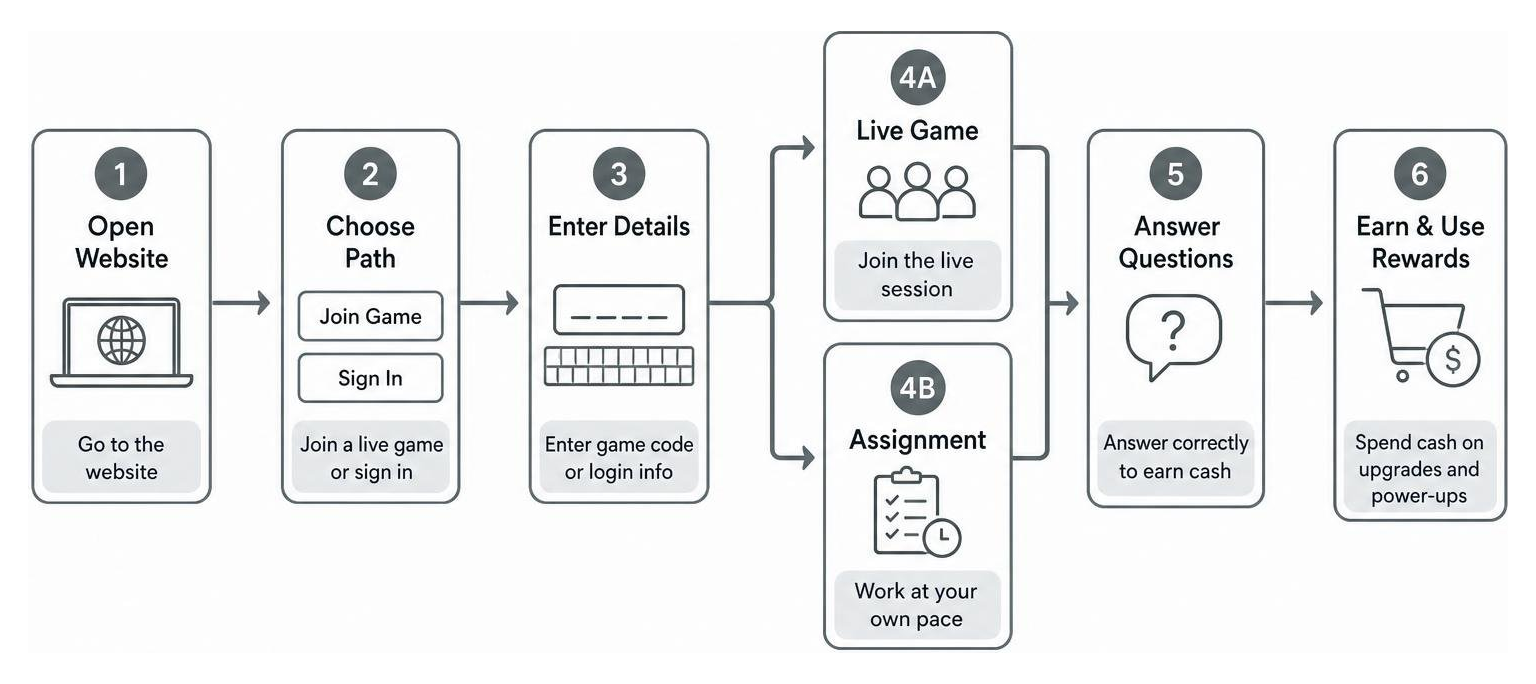
Gimkit turns review questions into games. Students answer questions to earn in-game cash, then use it for upgrades and power-ups. A live game happens at the same time for a group, while an assignment lets a student work independently and return later if needed.
This guide explains what the Gimkit Home page does, how to get in, and what Capital Region households should know before using it for school review, tutoring, or homeschool practice.
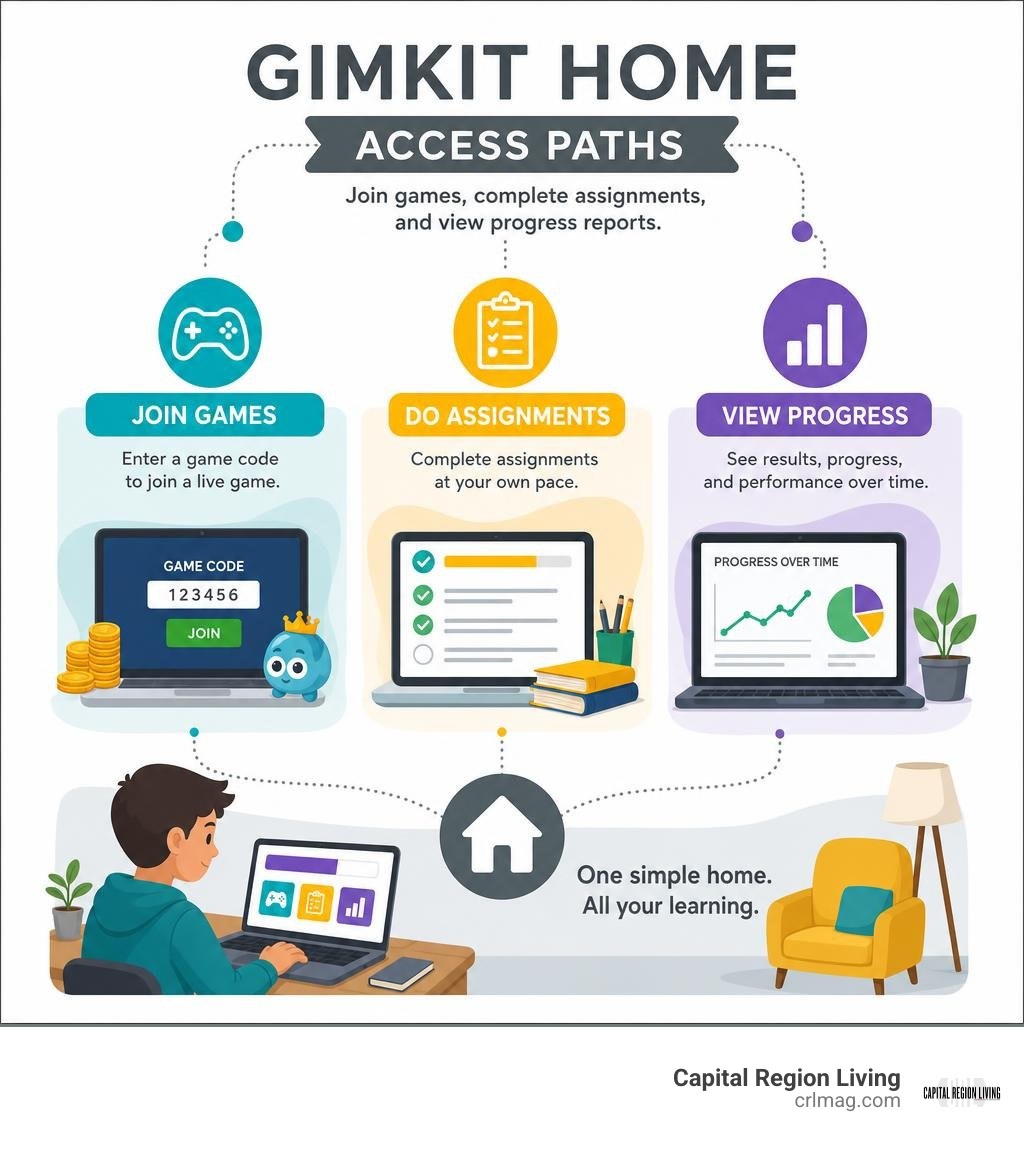
Key gimkit home vocabulary:
What is Gimkit Home and How Does It Work?
At its core, gimkit home serves as the central command post for the entire Gimkit learning ecosystem. Created in 2017 by high school student Josh Feinsilber—who initially built the tool to make his own high school coursework more engaging—the platform has grown into one of the most popular gamified study hubs across the country. In fact, research shows that game-based review improves student information retention by up to 42% compared to traditional paper worksheets.
When you land on the gimkit home page, the platform immediately distinguishes between two primary workflows: joining an active live game session hosted by an instructor or logging into a registered dashboard. Unlike static study guides, Gimkit – live learning game show operates on a dynamic game economy loop. As students answer multiple-choice or short-answer questions correctly, they earn virtual currency. This virtual cash can then be spent in the in-game shop on point multipliers, answer insurance, streak bonuses, and strategic power-ups.
Whether used for synchronous whole-class battles in a Capital Region school district or self-paced homework sessions in an Albany or Saratoga Springs residence, the platform bridges classroom instruction and home practice smoothly.
How to Join a Live Game from the Gimkit Home Dashboard
Joining a live game from the gimkit home landing screen requires zero complicated registration steps for students, making it hassle-free for late-afternoon review sessions or evening homework tasks. Here is the straightforward sequence:
- Open your web browser and navigate directly to the main portal.
- Click the prominent Join button located at the top of the screen.
- Enter the 5 to 6-digit game PIN or join code generated by the host.
- Input an appropriate display name as requested by the host’s settings.
- Wait in the virtual lobby until the host launches the game session.
If you ever run into hurdles during this initial setup, our comprehensive Beginners Guide To Gimkit Learn What It Is provides deeper context on account roles and foundational rules.
Setting Up Gimkit Home for Independent Practice and Homeschooling
For homeschool parents across New York’s Capital Region or tutors seeking structured independent practice routines, setting up a gimkit home environment is intuitive. Parents should register for an Educator Account rather than a student profile. Registering as an educator unlocks full access to kit creation, custom game hosting, and detailed student progress analytics.
Once registered, parents can organize local learners into dedicated digital classes, assign asynchronous kits as self-paced practice, and set specific deadline windows. Establishing micro-study habits—such as 10 to 15-minute daily practice routines—helps maintain high academic retention without causing screen fatigue.
Essential Dashboard Features for Teachers, Students, and Parents
Navigating the gimkit home dashboard reveals a sleek interface organized into functional tabs on the left navigation bar. Teachers, parents, and students can seamlessly access their customized tools:
- Kits: Your primary library containing all user-created or copied question sets.
- Classes: Dedicated roster management sections that integrate smoothly with systems like Google Classroom.
- Assignments: A repository for self-paced homework tasks with custom completion deadlines.
- Reports: Comprehensive post-game analytics detailing student accuracy and specific question performance.
- Cosmetics & Shop: A fun section where students customize their avatar “Gims”, stickers, and trails using earned GimBucks.
Managing Kits, Homework Assignments, and KitCollab
Creating effective question sets (known as “Kits”) is flexible on the gimkit home dashboard. Educators and parents can build kits from scratch using multiple-choice and text-input items, import existing flashcard decks directly from Quizlet via Set ID, or upload CSV files.
Key kit creation options include:
- KitCollab: A collaborative feature where students submit candidate questions in real-time, allowing the host to approve quality items before launching a class game.
- Smart Repetition: An intelligent system that re-introduces frequently missed questions to guarantee mastery.
- Media Uploads: Enhancing questions with audio clips and custom visual graphics.
- Automated Grading: Instant error checking that delivers self-paced assignments without requiring manual evaluation.
Game Modes, Shop Upgrades, and Learning Benefits
One reason Capital Region students love returning to gimkit home is its diverse library of over 10 distinct game modes. Rather than relying on standard quiz formats, Gimkit pairs academic review with creative gameplay mechanics.
Popular modes include:
- Trust No One: A social deduction mode inspired by popular mystery strategy games.
- Don’t Look Down / The Floor is Lava: High-stakes platforming challenges where correct answers build safe structures.
- Fishtopia & 2D World Modes: Immersive top-down exploration modes where students gather resources, complete quests, and answer study prompts.
By reinvesting earned virtual currency into strategic shop upgrades—such as point multipliers and streak insurance—students stay motivated. To dive deeper into optimizing these game layers for maximum educational impact, check out the GimkitHome Interactive Learning: Complete Guide.
Free vs. Pro Pricing Plans and Setup Options

Understanding subscription tiers helps Capital Region families and local school educators choose the right setup for their needs. Gimkit offers both a feature-packed free basic plan and an enhanced Pro subscription.
Comparing Free Basic and Pro Subscriptions
While the free basic account works well for occasional study sessions or small tutoring groups, it enforces a strict 5-player limit per live game session. Upgrading to Gimkit Pro removes this player limit and unlocks unlimited asynchronous home assignments.
| Feature / Capability | Gimkit Free Basic Plan | Gimkit Pro Individual Plan |
|---|---|---|
| Monthly Pricing | $0.00 / Free | $4.99/mo (billed annually at $59.88) or $9.99/mo |
| Live Game Player Limit | Cap of 5 players per game | Unlimited live players |
| Kit Storage Limit | Limited kit creation | Unlimited saved Kits |
| Free Trial | N/A | 14-day full feature free trial |
| Student-Paced Assignments | Restricted features | Full access with custom deadlines |
| Media & Audio Integration | Basic access | Complete image & audio uploading |
For local educators or parents considering an upgrade, the annual Gimkit Pro option saves nearly $20 compared to month-to-month billing.
Troubleshooting, Progress Tracking, and COPPA Safety
Effective learning tools must deliver meaningful insights while safeguarding student data. The gimkit home environment excels in providing transparent progress metrics and robust privacy protections.
Resolving Code Errors and Login Issues
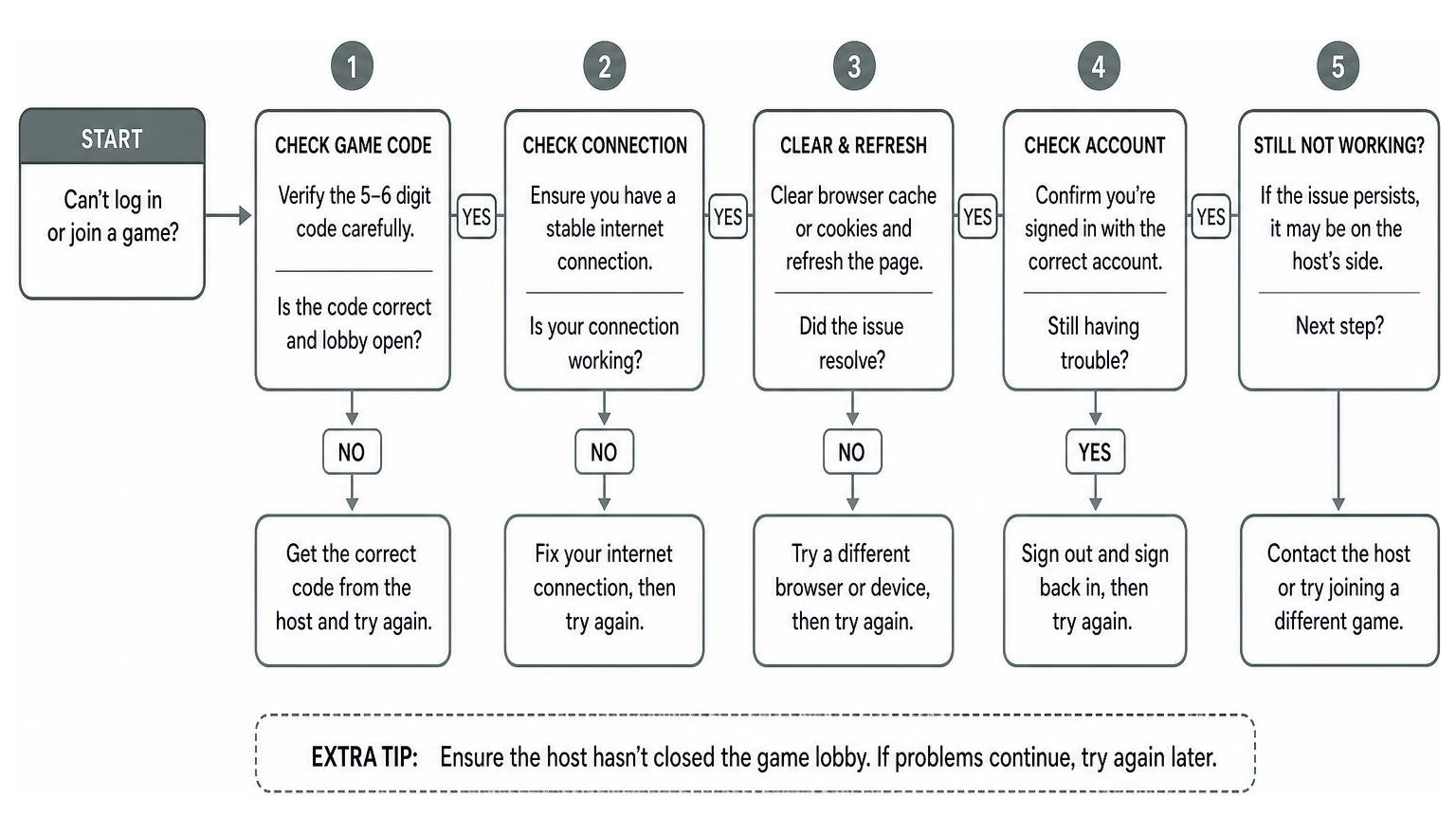
If a student encounters technical friction when accessing gimkit home, follow these quick diagnostic steps:
- Invalid Game Code: Verify the 5 to 6-digit PIN character-by-character. Ensure the host hasn’t closed the live lobby.
- Page Loading Failure: Clear your web browser cache, disable intrusive ad-block extensions, or test an alternative browser.
- Login Hurdles: Ensure single sign-on (SSO) credentials through Google Workspace match school-issued accounts. Confirm browser cookies are enabled.
Safety, Privacy, and COPPA Compliance
Gimkit complies strictly with the Children’s Online Privacy Protection Act (COPPA) and FERPA guidelines, making it safe for children under 13. The platform operates completely ad-free, ensuring students are never exposed to commercial marketing while studying. Furthermore, parents and teachers can utilize guest join modes (using join codes) so children can participate without disclosing personal identifiable information.
Frequently Asked Questions About Gimkit
How do students join a game from the home page?
Students navigate to the gimkit home portal at gimkit.com, click the Join button, type in the 5 or 6-digit game code provided by their teacher or parent host, enter their display name, and enter the live game lobby.
What is the difference between live play and home assignments?
Live play happens synchronously with a host running a real-time game for a group of simultaneous players. Home assignments run in asynchronous, student-paced mode, allowing individual learners to complete question kits independently before a specified deadline.
Can parents set up Gimkit without a school teacher account?
Yes! Parents can create an Educator Account using their personal email address. This allows home learning facilitators and homeschool parents to build custom kits, host private games for siblings or study groups, and track learning accuracy.
Conclusion
From reinforcing classroom curriculum in local Capital Region school districts to empowering independent homeschool routines in our upstate communities, gimkit home makes studying interactive, rewarding, and effective. By turning standard study sets into engaging game worlds, students retain core concepts faster while having genuine fun.
Whether you are a parent helping your child master math facts after dinner or an educator looking to spark classroom participation, getting started on the home dashboard takes only a few clicks. Explore local educational resources and community support in the Capital Region Business Directory to connect with regional learning opportunities today!